
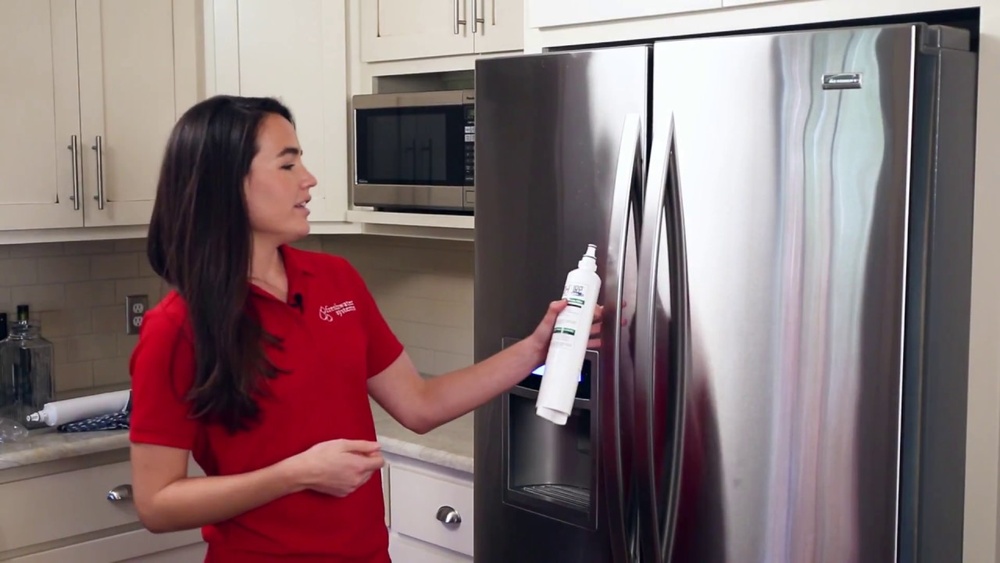
If your Kenmore fridge isn’t delivering fresh, clean water like it used to, your water filter might be the culprit. Replacing it is easier than you think, and doing it yourself can save you time and money.
In this guide, you’ll learn exactly how to replace the water filter in your Kenmore fridge quickly and without any hassle. Keep reading to discover simple steps that will help you enjoy pure, great-tasting water again—right from your own fridge.
Kenmore Fridge Water Filter Basics
Your Kenmore fridge water filter keeps water clean and fresh. It removes dirt, chlorine, and bad tastes. Changing the filter on time helps your fridge work well. It also protects your health by giving safe drinking water. Understanding the basics of your Kenmore water filter makes replacement easy.
Here are important details about the types of filters, signs to change them, and tools you need for replacement.
Types Of Kenmore Water Filters
Kenmore fridges use different water filters. The most common are cartridge filters and push-in filters. Cartridge filters are long and twist into place. Push-in filters fit with a simple push and lock system. Both types work to clean water but fit different fridge models. Check your user manual to find the right filter type.
Signs It’s Time To Replace
Change the water filter every six months or 200 gallons. Watch for slow water flow or strange taste in water. Cloudy or smelly water also signals replacement time. Some fridges have a filter light that turns on. This light alerts you to replace the filter soon. Ignoring these signs can reduce water quality and fridge performance.
Tools Needed For Replacement
Replacing your Kenmore water filter needs few tools. Usually, no special tools are required. A clean cloth helps wipe the filter area. Sometimes, a small wrench or pliers may be needed. Always check the instructions in your fridge manual. Prepare your tools before starting the replacement to save time.

Locating The Water Filter
Finding the water filter in your Kenmore fridge is the first step to a fresh water supply. Knowing the exact location helps you replace it quickly and keep your water clean. Each model may have a different filter spot. This guide will show where to check and how to open the filter area.
Common Filter Locations In Kenmore Fridges
Kenmore fridges usually place the water filter in one of three spots. The most common place is inside the fridge, near the top right corner. Some models have the filter at the bottom grille, near the kick plate. Others put the filter in the back, inside the fridge cavity. Look for a small cover or cap that hides the filter.
Accessing The Filter Compartment
To reach the filter, open the fridge door fully. If the filter is inside, remove the cover by twisting or pulling it gently. For filters at the bottom, you might need to open a panel or grille. Use your hands or a screwdriver if needed. Keep the area clean and dry before removing the old filter.
Removing The Old Filter
Removing the old water filter from your Kenmore fridge is the first step in keeping your water fresh. It is simple and quick when done right. This section guides you through the process clearly. Follow the steps carefully to avoid any damage.
Preparing The Fridge
Start by turning off the water supply to the fridge. This prevents leaks during filter removal. Next, open the fridge door fully for easy access. Locate the filter, usually inside the fridge or at the base grille. Clean around the filter area to avoid dirt falling inside.
Step-by-step Removal Process
Press the release button or twist the filter counterclockwise. Pull the filter gently out of its slot. Some models may require a firm pull. Hold a towel under the filter to catch any water drips. Dispose of the old filter properly. Keep it away from children and pets.
Installing The New Filter
Installing the new filter in your Kenmore fridge is a simple step. It ensures clean and fresh water for your home. Follow these steps carefully to place the filter correctly and secure it firmly.
Aligning The Filter Correctly
Begin by holding the new filter with the label facing out. Look inside the filter slot for the guide tabs. Match the filter tabs with the slot grooves. Align it gently without forcing the filter. This helps the filter fit perfectly in place.
Securing The Filter In Place
Push the filter into the slot slowly. Turn the filter clockwise until it stops. You will feel it lock into place. Do not over-tighten; just secure it firmly. Check the filter is stable and does not wobble.
Flushing The New Filter
Flushing the new water filter in your Kenmore fridge is a key step after installation. It helps remove any loose carbon particles and impurities from the filter. This process ensures clean and fresh-tasting water. Skipping this step can affect water quality and taste.
Why Flushing Is Important
Flushing clears out dust and small debris inside the new filter. These particles can make water look cloudy or taste strange. Flushing also activates the filter, allowing it to work properly. It helps avoid clogging and protects your fridge’s water system. Clean water means healthier drinks and better ice cubes.
How To Flush The Filter Properly
First, install the new filter securely in the fridge. Run cold water through the dispenser for about 3 to 5 minutes. This flushes out trapped air and loose carbon. Use a large container to catch the water during flushing. Turn off the water flow once the water runs clear. Your filter is now ready to provide clean water.
Resetting The Filter Indicator
Resetting the filter indicator on your Kenmore fridge is a key step after changing the water filter. This indicator helps track the filter’s usage and alerts you when a replacement is needed. Resetting it ensures your fridge shows the correct status and keeps your water clean and fresh.
Without resetting, the light may stay on even after installing a new filter. This can cause confusion about the filter’s condition. The reset process is simple and only takes a few moments.
Checking The Indicator Light
The filter indicator light shows the filter’s status. It usually glows red or orange when the filter needs changing. Some models also use a green or blue light to show a good filter condition.
Check this light before and after replacing the filter. If the light stays on after replacement, it means you need to reset the indicator. This step helps your fridge know the filter is new.
Steps To Reset On Kenmore Models
Find the reset button on the fridge control panel. It may be labeled “Reset Filter” or just “Filter.”
Press and hold the reset button for about 3 to 5 seconds. The indicator light will blink or turn off, showing the reset is complete.
Release the button and wait a few seconds. The light should now show that the filter is fresh. If not, repeat the process or consult your fridge manual.
Troubleshooting Common Issues
Troubleshooting common issues during the water filter replacement in your Kenmore fridge saves time. Knowing the usual problems helps fix them fast. It also keeps your fridge working well and your water clean.
Below are some typical issues and clear steps to solve them.
Water Flow Problems
Slow or no water flow often means a clogged filter. Replace the filter if it is old or blocked. Check the water line for kinks or damage. Clear any blockages in the water line. Also, make sure the filter is installed correctly. A loose filter can stop water flow.
Leaks And Seal Issues
Leaks usually come from a poor seal around the filter. Remove and check the filter’s O-ring for damage or dirt. Clean or replace the O-ring if needed. Push the filter firmly into place to create a tight seal. Avoid over-tightening as it may cause cracks or leaks. Check the filter housing for cracks or wear.
Filter Compatibility Tips
Use only filters made for your Kenmore fridge model. Wrong filters can cause leaks and poor water quality. Check the filter number on your fridge or in the manual. Buy filters from trusted brands or authorized sellers. Always keep a spare filter on hand for quick replacement. Proper filters improve water taste and fridge performance.

Maintaining Your Water Filter
Maintaining your Kenmore fridge water filter is key to clean and fresh water. A well-kept filter protects your health and keeps the fridge working well. Regular care helps avoid bad tastes and clogs. It also stops bacteria from growing inside the filter.
Replacement Frequency Recommendations
Change the water filter every six months. This timing works for most households. If you use more water, change it more often. Some filters may last up to a year. Follow the instructions in your fridge manual. Using an old filter can reduce water flow. It can also let impurities pass through.
Tips For Prolonging Filter Life
Flush the new filter before use. Run water for a few minutes to clear air and dust. Keep the fridge temperature steady. Avoid opening the door too often. Use cold water only; hot water can damage the filter. Store water properly to reduce dirt in the system. Check for leaks around the filter area. Clean the filter housing gently during each replacement.

Frequently Asked Questions
How Often Should I Replace Kenmore Fridge Water Filter?
Replace the water filter every 6 months or after filtering 200 gallons. This ensures clean, fresh water and optimal fridge performance. If water flow slows or taste changes, replace sooner.
Where Is The Water Filter Located In Kenmore Fridge?
The water filter is usually inside the fridge, near the top right corner or bottom grille. Check your model’s manual for exact location and replacement instructions.
How Do I Reset The Water Filter Indicator On Kenmore Fridge?
After replacing the filter, press and hold the reset button for 3 seconds. The indicator light will turn off, confirming the filter has been reset.
Can I Use Any Water Filter For Kenmore Fridge?
Use only Kenmore-approved filters or compatible models. Generic filters may not fit correctly and can affect water quality or fridge function.
Conclusion
Replacing the water filter in your Kenmore fridge is simple and quick. Regular changes keep your water clean and fresh. Follow the steps carefully to avoid mistakes. Clean water helps your family stay healthy. Don’t wait until the water tastes off or the light turns on.
A fresh filter improves fridge performance and water flow. Stay on schedule to enjoy pure water every day. Easy to do, good to do. Your fridge and health will thank you.

Hasan Al Sarker is a Reverse Osmosis Specialist. He has worked for many years to ensure safe drinking water for all. His research paper has been published in several journals, including Issue, Medium, and Slideshare. He is recognized as a water doctor among specialists though he did not attend medical college.
Besides working as a researcher of reverse osmosis technology, he is also very fancy with the kitchen and cooking. His guides are reading thousands of people every day. As a head of content, he is responsible for all the published articles at RO System Reviews.